ia.yzu.edu.tw totorupiah.me
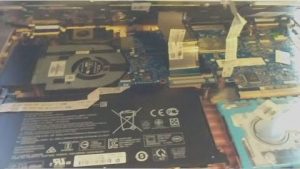
CRLDesigns https://crldesigns.net Web Design, Hosting, Maintenance in Sylvania GA Wed, 21 Aug 2019 12:45:59 +0000 en-US hourly 1 HP Pavilion x360 Hard Drive Replacement https://crldesigns.net/hp-pavilion-x360-hard-drive-replacement/ https://crldesigns.net/hp-pavilion-x360-hard-drive-replacement/#respond Tue, 20 Aug 2019 21:19:13 +0000 https://crldesigns.net/?p=10010 The Problem We received an HP Pavilion x360 laptop and the hard drive was failing the smart status check and would not boot most of the time.  Luckily the hard drive is really easy to replace on this model and since the Windows install Key is embedded in the BIOS, we just replaced the drive, reinstalled windows and then replace the HP software and drivers. The Repair The removal and re-installation process is very straight forward.  There are a few hidden screws on the bottom of the HP Pavilion x360 case, but if you watch the short tear-down video linked below it will show you the locations.  All total there are only six screws you need to remove.  Then use a sturdy pry tool that won’t damage the case and separate the two pieces.  It takes some work to get it started but once you get one corner popped up, the rest comes up easily.  Be cautious not to pull too hard on the cover, as there are two ribbon cables that will need to be removed before it comes off completely.  Once the hard drive is replaced and everything is back together, you’ll need to install your Operating System.  In most cases for most people this will be Windows 10 and that is what was preinstalled on this machine.  Most laptops and desktops do not come with a license key sticker on the case any more as it is embedded into the BIOS from the factory.  We were able to use Microsoft’s Media Creation tool, found at this link.  Once downloaded and the boot files loaded onto a flash drive, simply insert into the laptop boot-up and follow the prompts like you would installing a fresh copy of Windows.  It locates the key in the BIOS and installs and...
Continue Reading

The post HP Pavilion x360 Hard Drive Replacement appeared first on CRLDesigns.

]]>
The Problem

We received an HP Pavilion x360 laptop and the hard drive was failing the smart status check and would not boot most of the time.  Luckily the hard drive is really easy to replace on this model and since the Windows install Key is embedded in the BIOS, we just replaced the drive, reinstalled windows and then replace the HP software and drivers.

The Repair

HP Pavilion x360The removal and re-installation process is very straight forward.  There are a few hidden screws on the bottom of the HP Pavilion x360 case, but if you watch the short tear-down video linked below it will show you the locations.  All total there are only six screws you need to remove.  Then use a sturdy pry tool that won’t damage the case and separate the two pieces.  It takes some work to get it started but once you get one corner popped up, the rest comes up easily.  Be cautious not to pull too hard on the cover, as there are two ribbon cables that will need to be removed before it comes off completely.  Once the hard drive is replaced and everything is back together, you’ll need to install your Operating System.  In most cases for most people this will be Windows 10 and that is what was preinstalled on this machine.  Most laptops and desktops do not come with a license key sticker on the case any more as it is embedded into the BIOS from the factory.  We were able to use Microsoft’s Media Creation tool, found at this link.  Once downloaded and the boot files loaded onto a flash drive, simply insert into the laptop boot-up and follow the prompts like you would installing a fresh copy of Windows.  It locates the key in the BIOS and installs and activates Windows.  Afterward, we downloaded the HP utility program and let it search and install all of the missing drivers.  Then the computer was back up and running like new again.

Overall in difficulty this is not a difficult repair.  It takes some patience when using the pry tool to get the pieces apart, but otherwise everything is easy to accomplish.

I’ve included a short video of the case removal process for the HP Pavilion x360 if you’d like to follow along. And of course if you need help with anything at all, don’t hesitate to leave a comment or contact us.  Also, feel free to subscribe to our YouTube Channel to see other videos.  Thank you!


The post HP Pavilion x360 Hard Drive Replacement appeared first on CRLDesigns.

]]>
https://crldesigns.net/hp-pavilion-x360-hard-drive-replacement/feed/ 0
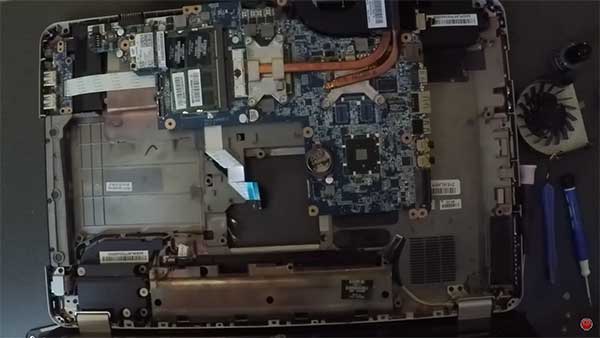
HP Pavilion dv7-4087cl Hard Drive and Fan Replacement https://crldesigns.net/hp-pavilion-dv7-4087cl-hard-drive-and-fan-replacement/ https://crldesigns.net/hp-pavilion-dv7-4087cl-hard-drive-and-fan-replacement/#respond Thu, 30 May 2019 19:48:33 +0000 https://crldesigns.net/?p=9945 The Problem We recently received an HP Pavilion dv7-4087cl laptop where the hard drive had gone out and would not boot and the owner also complained about the cooling fan needing to be replaced.  The hard drive is really no issue as long as you have the Windows product key or license to reinstall the software and then replace the HP software and drivers.  But the fan replacement is another matter.  It unfortunately requires disassembling the entire laptop to remove the fan.  Not to mention the fan is one of those harder to find pieces that took almost three weeks to get here from overseas. The Repair The removal and re-installation process is very straight forward.  The thing to keep in mind is that you really have to take almost every piece apart to get the motherboard out in order to get to the tiny screws that hold the cooling fan in place.  While I had everything apart I thought it would also be a good idea to clean and replace the thermal paste on the processor and graphics chip to make sure it was fresh and doing its job.  Just be sure to disconnect the WIFI antennae wires as well as any ribbon cables before you start trying to remove too many pieces as you could tear or damage something in the process if you forget one. Overall in difficulty this is not a difficult repair, just time consuming.  I suggest not getting in a rush and keep up with all of you small parts and screws. I’ve included a short video of the removal and re-installation process for the HP Pavilion dv7-4087cl if you’d like to follow along. And of course if you need help with anything at all, don’t hesitate to leave a comment or contact us. ...
Continue Reading

The post HP Pavilion dv7-4087cl Hard Drive and Fan Replacement appeared first on CRLDesigns.

]]>
The Problem

We recently received an HP Pavilion dv7-4087cl laptop where the hard drive had gone out and would not boot and the owner also complained about the cooling fan needing to be replaced.  The hard drive is really no issue as long as you have the Windows product key or license to reinstall the software and then replace the HP software and drivers.  But the fan replacement is another matter.  It unfortunately requires disassembling the entire laptop to remove the fan.  Not to mention the fan is one of those harder to find pieces that took almost three weeks to get here from overseas.

The Repair

HP Pavilion dv7-4087cl

HP Pavilion dv7-4087cl

The removal and re-installation process is very straight forward.  The thing to keep in mind is that you really have to take almost every piece apart to get the motherboard out in order to get to the tiny screws that hold the cooling fan in place.  While I had everything apart I thought it would also be a good idea to clean and replace the thermal paste on the processor and graphics chip to make sure it was fresh and doing its job.  Just be sure to disconnect the WIFI antennae wires as well as any ribbon cables before you start trying to remove too many pieces as you could tear or damage something in the process if you forget one.

Overall in difficulty this is not a difficult repair, just time consuming.  I suggest not getting in a rush and keep up with all of you small parts and screws.

I’ve included a short video of the removal and re-installation process for the HP Pavilion dv7-4087cl if you’d like to follow along. And of course if you need help with anything at all, don’t hesitate to leave a comment or contact us.  Also, feel free to subscribe to our YouTube Channel to see other videos.  Thank you!


The post HP Pavilion dv7-4087cl Hard Drive and Fan Replacement appeared first on CRLDesigns.

]]>
https://crldesigns.net/hp-pavilion-dv7-4087cl-hard-drive-and-fan-replacement/feed/ 0
Why Design Is Important for Small Businesses in Georgia https://crldesigns.net/why-design-is-important-for-small-businesses-in-georgia/ https://crldesigns.net/why-design-is-important-for-small-businesses-in-georgia/#respond Mon, 06 May 2019 21:04:55 +0000 https://crldesigns.net/?p=9931 Why Design Is Important for Small Businesses in Georgia What do peaches, a giant peanut and The Walking Dead have in common? The great state of Georgia of course! Georgia is well known for its rich history, vibrant culture and bustling city life which makes it the perfect place to start a small business. But how can you make your business stand out among the many other startups in the state? The answer is design. Using design as an effective tool can boost your marketing so that you stand out from the masses. Do you want to know why? We’ll tell you everything you need to know. Design Makes You Recognizable Your logo design is the first aspect of your company that people notice and it’s what they remember long after working with you. If your logo is effective, customers will recognize your brand whenever they see your merchandise. That’s why it’s so important to ensure that your logo makes an impact. Businesses such as Apple, McDonald’s and Nike are renowned for their recognizable logos and even they were small businesses once. You want a logo that will be imprinted in potential clients’ memories so when they require your services, it’s your company name that comes up. Why not appeal to a Georgian audience by including symbolic images in your logo such as the Cherokee rose or the honeybee? When customers recognize imagery that they’re fond of, they’re more likely to be attracted to your business. Design Establishes Your Identity Your small business’s success depends on the identity that you establish. One of the best ways to create your identity is through design. This process starts with your logo but is also reflected in all of your marketing tools from social media accounts to website design. Identity design affects the...

Continue Reading

The post Why Design Is Important for Small Businesses in Georgia appeared first on CRLDesigns.

]]>
Why Design Is Important for Small Businesses in Georgia

What do peaches, a giant peanut and The Walking Dead have in common? The great state of Georgia of course! Georgia is well known for its rich history, vibrant culture and bustling city life which makes it the perfect place to start a small business. But how can you make your business stand out among the many other startups in the state?

The answer is design. Using design as an effective tool can boost your marketing so that you stand out from the masses. Do you want to know why? We’ll tell you everything you need to know.

Design Makes You Recognizable

Your logo design is the first aspect of your company that people notice and it’s what they remember long after working with you. If your logo is effective, customers will recognize your brand whenever they see your merchandise. That’s why it’s so important to ensure that your logo makes an impact.

Businesses such as Apple, McDonald’s and Nike are renowned for their recognizable logos and even they were small businesses once. You want a logo that will be imprinted in potential clients’ memories so when they require your services, it’s your company name that comes up.

Why not appeal to a Georgian audience by including symbolic images in your logo such as the Cherokee rose or the honeybee? When customers recognize imagery that they’re fond of, they’re more likely to be attracted to your business.

Design Establishes Your Identity

Your small business’s success depends on the identity that you establish. One of the best ways to create your identity is through design. This process starts with your logo but is also reflected in all of your marketing tools from social media accounts to website design.

Design

Identity design affects the success of your business because it attracts a certain target market. If the image you create doesn’t appeal to the right target market, you won’t be able to build up a large enough, relevant customer base.

Every aspect of design is important for attracting customers from the colors you use to the pictures on your advertising material. Bright, playful colors will be more appropriate for children while professional, sophisticated designs will appeal to technology gurus. In Georgia, your identity should reflect the state’s values such as promoting diversity or encouraging learning.

Design Gives Your Campaigns More Visibility

If a potential customer opens your email newsletter only to find black writing on a white background, it’s unlikely that they’ll read any further. The same goes for your webpage. Most readers will close an internet article after 15 seconds. Success depends on holding their attention longer than that.

By using design, you can make your marketing material dynamic so that it holds your customer’s attention. This will improve your bounce rate and will also convince customers to keep browsing to view your products. Incorporating vivid graphics and spreading your company colors throughout your marketing platforms can transform your advertising.

Outside of the internet, you can use design to give your business visibility by using your color theme and imagery in uniforms, shop décor, billboards and even advertisements. All of these examples add to the identity you’re trying to create.

Design Improves Your Conversion and ROI

If your design is effective enough you’ll increase your customer conversion rates as well as your ROI. This means that people viewing your online marketing are more likely to become paying customers. As a result, you’re more likely to earn a profit on money you’ve spent on advertising.

Georgia is known for its busy cities that are juxtaposed by open wilderness. Online sales are your most important means of income so you can have a larger audience to sell to; even those not close to business hubs. You do this by drawing in customers through effective website design through good user experience.

By using your brand colors consistently in CTAs on your website, clients will associate these colors with your business. The same goes for graphic design themes you’ve repeated in marketing brochures and flyers. If customers are constantly reminded of your business, they’ll eventually be tempted to see what you have to offer.

Conclusion

When it comes to marketing your business, design is your most effective tool. Small businesses are oversaturated in states as large as Georgia. If you want to stand out, you need to learn how to use design effectively to convince customers that they should pay money to your company.

It’s not as difficult as it seems as long as you learn all the tricks of the trade or employ a designer to manage your marketing for you. Aren’t you tempted to see how far design can take your business?

Author Bio

Olivia Harris is a freelance writer who loves coffee, cats and churros, not in any particular order. She travels to write, writes to travel. Connect with her for writing projects freelance work.


The post Why Design Is Important for Small Businesses in Georgia appeared first on CRLDesigns.

]]>
https://crldesigns.net/why-design-is-important-for-small-businesses-in-georgia/feed/ 0
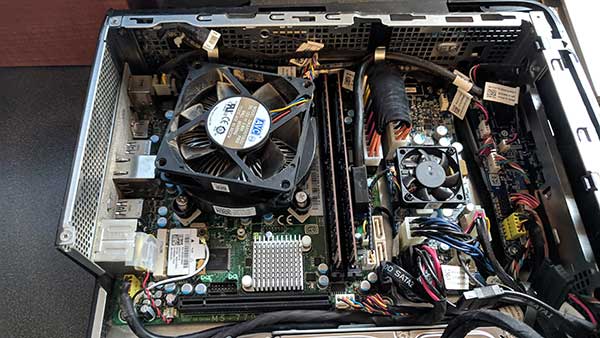
Alienware X51 motherboard replacement https://crldesigns.net/alienware-x51-motherboard-replacement/ https://crldesigns.net/alienware-x51-motherboard-replacement/#respond Thu, 31 Jan 2019 16:37:04 +0000 https://crldesigns.net/?p=9894 The Problem We recently received an Alienware computer that would load Windows sometimes but more and more often would not get past the boot-up screen.  It was beeping once a second and then refusing to load.  After troubleshooting and testing all of the easy things, we narrowed it down to the motherboard with the aid of Dell’s beep code guides.  The most difficult part of the Alienware X51 motherboard replacement was just getting one ordered and in from Hong Kong.  It takes quite a while to get anything shipped from overseas. The Repair The removal and re-installation process is very straight forward.  Simply remove the wiring and connectors.  I like to snap a few quick pictures with my phone, just in case I need to refer to something quickly later on.  You’ll need to remove the CPU fan and the back mounting plate from the old motherboard to transfer to the new one.  It is held on with some strong adhesive, but I was able to slice it off with a flat blade.  Then clean off old thermal paste and apply a fresh application.  Seat everything back in its place and reconnect the wiring, making sure everything is firmly connected. The most annoying part of the repair is getting it to boot into Windows again.  This particular computer has Windows 8 installed on it.  The new Alienware X51 motherboard replacement came with the boot settings different and needs to be updated.  I changed the boot devices, and also boot mode from Legacy to UEFI.  That still did not seem to work so I went back and turned secure boot mode on, and cleared the boot keys.  It took a while for the computer to load completely into Windows, but it finally did.  The last step is to reauthorize Windows 8. ...
Continue Reading

The post Alienware X51 motherboard replacement appeared first on CRLDesigns.

]]>
The Problem

We recently received an Alienware computer that would load Windows sometimes but more and more often would not get past the boot-up screen.  It was beeping once a second and then refusing to load.  After troubleshooting and testing all of the easy things, we narrowed it down to the motherboard with the aid of Dell’s beep code guides.  The most difficult part of the Alienware X51 motherboard replacement was just getting one ordered and in from Hong Kong.  It takes quite a while to get anything shipped from overseas.

Alienware X51 motherboard replacement

Alienware X51 Motherboard Replacement

The Repair

The removal and re-installation process is very straight forward.  Simply remove the wiring and connectors.  I like to snap a few quick pictures with my phone, just in case I need to refer to something quickly later on.  You’ll need to remove the CPU fan and the back mounting plate from the old motherboard to transfer to the new one.  It is held on with some strong adhesive, but I was able to slice it off with a flat blade.  Then clean off old thermal paste and apply a fresh application.  Seat everything back in its place and reconnect the wiring, making sure everything is firmly connected.

The most annoying part of the repair is getting it to boot into Windows again.  This particular computer has Windows 8 installed on it.  The new Alienware X51 motherboard replacement came with the boot settings different and needs to be updated.  I changed the boot devices, and also boot mode from Legacy to UEFI.  That still did not seem to work so I went back and turned secure boot mode on, and cleared the boot keys.  It took a while for the computer to load completely into Windows, but it finally did.  The last step is to reauthorize Windows 8.  I connect to the internet and let it reauthorize, and everything is back up and running like normal again.

I’ve included a short video of the removal and re-installation process if you’d like to follow along.  And of course if you need help with anything at all, don’t hesitate to leave a comment or contact us.


The post Alienware X51 motherboard replacement appeared first on CRLDesigns.

]]>
https://crldesigns.net/alienware-x51-motherboard-replacement/feed/ 0
Disable Gutenberg WordPress Editor https://crldesigns.net/disable-gutenberg-wordpress-editor/ https://crldesigns.net/disable-gutenberg-wordpress-editor/#respond Thu, 13 Dec 2018 22:17:52 +0000 http://crldesigns.net/?p=9865 If you’ve already updated your WordPress version, like I have, to 5.0 you’ve probably noticed the huge change that comes in the form of the new editor named Gutenberg.  And if you’re also like myself and use another form of a plugin or editor for your site, the first thing you probably asked yourself, is how do I disable Gutenberg? Users new to the WordPress platform probably do not need to worry about it as much as those of us who have been accustomed to using the platform for years.  Although, people using themes for WordPress might need this just as much, because many themes come bundled with page editors right out of the box.  And the new Gutenberg update/addon can override them. The answer is a simple plugin, created by Jeff Starr and can be found here.  While I do not like to add too many plugins to my sites or projects, I feel this one will be necessary.  It’s quick, painless and best of all, free.  After the quick download, install, activation; I return to my pages and posts and I am gladly met by my normal page editor and resume working. Now, do you need to disable Gutenberg?  That’s entirely up to you, your site and your circumstances.  Gutenberg has some powerful new features and will be a great asset to many site builders or owners, that do not know code, or simply don’t want to bother with it.  For my particular case, it made more sense to disable it.  I had quite a bit of custom code generated by a different page builder that would not be recognized by the new editor.  But for new sites, I would recommend leaving it active and see what it has to offer, you may end up liking it better....

Continue Reading

The post Disable Gutenberg WordPress Editor appeared first on CRLDesigns.

]]>
If you’ve already updated your WordPress version, like I have, to 5.0 you’ve probably noticed the huge change that comes in the form of the new editor named Gutenberg.  And if you’re also like myself and use another form of a plugin or editor for your site, the first thing you probably asked yourself, is how do I disable Gutenberg?

Disable GutenbergUsers new to the WordPress platform probably do not need to worry about it as much as those of us who have been accustomed to using the platform for years.  Although, people using themes for WordPress might need this just as much, because many themes come bundled with page editors right out of the box.  And the new Gutenberg update/addon can override them.

The answer is a simple plugin, created by Jeff Starr and can be found here.  While I do not like to add too many plugins to my sites or projects, I feel this one will be necessary.  It’s quick, painless and best of all, free.  After the quick download, install, activation; I return to my pages and posts and I am gladly met by my normal page editor and resume working.

Now, do you need to disable Gutenberg?  That’s entirely up to you, your site and your circumstances.  Gutenberg has some powerful new features and will be a great asset to many site builders or owners, that do not know code, or simply don’t want to bother with it.  For my particular case, it made more sense to disable it.  I had quite a bit of custom code generated by a different page builder that would not be recognized by the new editor.  But for new sites, I would recommend leaving it active and see what it has to offer, you may end up liking it better.

Of course, as always, if you need help with anything website related or have questions; feel free to contact us.


The post Disable Gutenberg WordPress Editor appeared first on CRLDesigns.

]]>
https://crldesigns.net/disable-gutenberg-wordpress-editor/feed/ 0
CRLDesigns joins Screven County Chamber of Commerce https://crldesigns.net/crldesigns-joins-screven-county-chamber-of-commerce/ https://crldesigns.net/crldesigns-joins-screven-county-chamber-of-commerce/#respond Wed, 17 Oct 2018 15:54:49 +0000 http://crldesigns.net/?p=9816 CRLDesigns has joined the Screven County Chamber of Commerce.  We are proud to be a member and offer our services to other local businesses.  Being a small business in the community, we understand the importance of supporting your local businesses.  With the far reaching arms of the internet, it’s easy to forget the local businesses that operate in your area.  That’s why we felt it was important to join the local Chamber and help support these local businesses.  When you have giants like Amazon gobbling up competition, it’s even more important not to forget these local shop keepers.  Sure it’s easy to hop on the internet, order something and have it at your doorstep in a few days.  But we lose contact with real people, besides that, when we don’t shop locally it hurts families that live next door. So therefore, before you make your next decision about a home repair or whatever the case may be, why not check out the businesses located on your Screven County Chamber of Commerce Business Page and see if there is someone local that can do the job for you.  You’ll be helping a family or helping pay tuition to send someone to school.  While we strive to bring more businesses and people to the internet and build them great websites; it is still vital that you remember to shop local whenever possible.  But regardless, whether you need tech advise, any website help, or general computer aid, we are here to help. To see a list of our projects and browse our portfolio click here.  And for a full list of our services, be sure to check out our comprehensive services page.  And as always if you don’t see a service that you need or just have a questions about anything at all,...

Continue Reading

The post CRLDesigns joins Screven County Chamber of Commerce appeared first on CRLDesigns.

]]>
CRLDesigns has joined the Screven County Chamber of Commerce.  We are proud to be a member and offer our services to other local businesses.  Being a small business in the community, we understand the importance of supporting your local businesses.  With the far reaching arms of the internet, it’s easy to forget the local businesses that operate in your area.  That’s why we felt it was important to join the local Chamber and help support these local businesses.  When you have giants like Amazon gobbling up competition, it’s even more important not to forget these local shop keepers.  Sure it’s easy to hop on the internet, order something and have it at your doorstep in a few days.  But we lose contact with real people, besides that, when we don’t shop locally it hurts families that live next door.

So therefore, before you make your next decision about a home repair or whatever the case may be, why not check out the businesses located on your Screven County Chamber of Commerce Business Page and see if there is someone local that can do the job for you.  You’ll be helping a family or helping pay tuition to send someone to school.  While we strive to bring more businesses and people to the internet and build them great websites; it is still vital that you remember to shop local whenever possible.  But regardless, whether you need tech advise, any website help, or general computer aid, we are here to help.

Screven County Chamber of Commerce

To see a list of our projects and browse our portfolio click here.  And for a full list of our services, be sure to check out our comprehensive services page.  And as always if you don’t see a service that you need or just have a questions about anything at all, please feel free to contact us any time.


The post CRLDesigns joins Screven County Chamber of Commerce appeared first on CRLDesigns.

]]>
https://crldesigns.net/crldesigns-joins-screven-county-chamber-of-commerce/feed/ 0
Web Design Loyalty https://crldesigns.net/web-design-loyalty/ https://crldesigns.net/web-design-loyalty/#respond Tue, 18 Sep 2018 16:19:30 +0000 http://crldesigns.net/?p=9776 Web Design Loyalty Web Design Loyalty has become a larger problem over the years.  Clients jumping ship to the next web designer or design firm that promises them huge results.  I blame the phenomenon on the amount of designers, freelance or otherwise, that have saturated the market.  I’m not throwing stones however, because I fit in that same category.  Let’s talk about the problem and potential solutions. The Problem Most of the problem when it comes to Web Design Loyalty starts with the client, and their lack of knowledge on the subject and just what it takes to get the job done.  That’s where it becomes crucial for the web designers to educate these potential clients on what exactly it takes to get the job completed and above all, be realistic about it.  Most of these clients aren’t going to know anything about the technical terms you will be throwing around (hosting, DNS, propagation, WHM, VPS, etc.); and that’s where some web designers might see an opportunity to take advantage of that lack of understanding.  But taking the time up front in the beginning might save you work or even earn you more work in the long run. If a designer takes an extra step in the beginning of a project to go over some of the details and outline the steps that they plan to take to get this new project completed, the client will be more comfortable through-out the process.  Most of us, especially me, want to see results, something getting done, so we want to rush to setup a new hosting package, or new account on our server, install some website software and get things started.  This is normally the fun part for me, it’s when you can see the largest results, before you get into the...

Continue Reading

The post Web Design Loyalty appeared first on CRLDesigns.

]]>
Web Design Loyalty

Web Design Loyalty has become a larger problem over the years.  Clients jumping ship to the next web designer or design firm that promises them huge results.  I blame the phenomenon on the amount of designers, freelance or otherwise, that have saturated the market.  I’m not throwing stones however, because I fit in that same category.  Let’s talk about the problem and potential solutions.

The Problem

Web Design LoyaltyMost of the problem when it comes to Web Design Loyalty starts with the client, and their lack of knowledge on the subject and just what it takes to get the job done.  That’s where it becomes crucial for the web designers to educate these potential clients on what exactly it takes to get the job completed and above all, be realistic about it.  Most of these clients aren’t going to know anything about the technical terms you will be throwing around (hosting, DNS, propagation, WHM, VPS, etc.); and that’s where some web designers might see an opportunity to take advantage of that lack of understanding.  But taking the time up front in the beginning might save you work or even earn you more work in the long run.

If a designer takes an extra step in the beginning of a project to go over some of the details and outline the steps that they plan to take to get this new project completed, the client will be more comfortable through-out the process.  Most of us, especially me, want to see results, something getting done, so we want to rush to setup a new hosting package, or new account on our server, install some website software and get things started.  This is normally the fun part for me, it’s when you can see the largest results, before you get into the “work” of content creation and fine tuning and client reviews.

But back to the problem at hand.  If you don’t take the time up front to explain to the client what you are capable of, or the steps you plan to take, or just all of the tools and knowledge you have at your disposal; you are leaving the door wide open for someone else to come in and take your client and work away from you.  For instance if you don’t make it known that you can provide a security solution, or a backup solution, email solution; then they may never know.  Some of these clients may be tasked with finding these solutions on their own, and where do they turn, Google.  The client won’t think to ask the web designer because it’s been months since they’ve talked to them and this couldn’t be related, could it???

The Situation

About four to five years ago I was hired to build a new website for a company.  They had a very basic HTML site that was fine fifteen years ago, but they needed something new and mobile friendly.  So I set to work building a new site, new features, mobile friendly; everything they asked for.  Got the site finished and live online in short order, they loved it, I got paid, case closed.  I typically try to check in with all of my clients regularly to see if they need anything; updates, new ideas, anything at all.  But I will be the first to admit this one didn’t get the attention it deserved and I paid for it.

About two years after the site was finished, I was sending a new potential client some reference site links of past work and was going to include this one as well.  I browsed to it and to my surprise it was nowhere near like I had left it.  Another company had come in behind me and had taken my design, pictures, etc. changed some things around and slapped their name right in the footer.  I tried to be the better person and not be upset about it, but it was difficult to do.  It’s like when a girlfriend breaks up with you with no explanation, and you’re left wondering what you did wrong.  Where was the web design loyalty then, what happened?  I thought I’d never know and figured it was petty to just call them or email and ask what happened?  So I left it alone and moved on to the next job.

Fast forward about four years later.  I get a call from a marketing company that has been called in to revamp the entire brand for this company that I originally did the site for.  They understood that I did the original design and wanted me back on board for the redesign as well.  The pieces were starting to fall into place.  I finally figured out that a different marketing company had come in behind me and promised the moon and stars and that they could drive more traffic to the site and do social media posts, etc. etc.  Without consulting with me to see if I could perform the same tasks the company jumped ship and went with the other website designer, again, no web design loyalty at all.  After a few nightmare years with this marketing company with no results, they decided to cut their losses.

After quite a bit of money spent and time wasted, we are back to where we started.  The company has another brand new website and is getting the results they were after.  I’ve teamed up with the new marketing company to make sure everything they need is accounted for.  Most if not all of these issues could have been avoided altogether by simply asking me if I offered those services or could handle it for them.  But I can’t completely pass the blame, it was just as much my fault for not educating them on what I could do for their business.

The Solution

Web Design LoyaltyIn order to retain web design loyalty, web designers have to be diligent about educating potential or existing clients on their services and capabilities.  Most of us have some sort of website that outlines these services, but we can’t rely on clients to actually go there and read anything.  Perhaps it’s just a quick numbered list of services you provide that you email to them.  Or it’s a newsletter you send out to remind people what you can do to help their site and business grow.

The Moral

The moral of the story is that if you expect clients to give you web design loyalty you have to do something about it and be proactive.  You cannot afford to sit back and hope they return.

For a full list of services that we offer, click here.  If you don’t see something you need, feel free to contact us here.


The post Web Design Loyalty appeared first on CRLDesigns.

]]>
https://crldesigns.net/web-design-loyalty/feed/ 0
Domain Health Tools https://crldesigns.net/domain-health-tools/ https://crldesigns.net/domain-health-tools/#respond Tue, 16 Jan 2018 15:38:08 +0000 http://crldesigns.net/?p=9630 A free website that I use all of the time is https://www.whatsmydns.net/ it allows me to check domain health and statistics for various records to make sure everything is configured correctly.  When you update domain names at registrars strange things can occur.  They typically warn you that it can take up to 24 hours for it to propagate through all servers across the globe, but I will find errors after that time period that I’ll have to track down and fix.  Some of these errors come from hosting a site on a different account or service than where the domain is registered.  If the hosting account and domain both reside with GoDaddy, usually they will make sure everything is set correctly.  But if you have the domain with GoDaddy and the hosting account is on your own service or hosting provider, things can get out of sync quickly.  It’s usually straight forward, but I find the most problems when you are working on creating a new site for a client when the old one is still live.  Once everything is approved on the new site and ready to go live, sometimes another IP address or DNS record get transferred that you didn’t need and can cause issues.  Having access to the Zone editor records usually cleans these problems up quickly, but again, using the site above helps you track down what the problem is to start with.  It is important to make sure your Domain Health is in good working order.  A DNS record that is not functioning properly can cause a bad user experience and ultimately turn potential clients or customers away.  If you need assistance, if it’s over your head, or you simply don’t have the time; Domain Health is another aspect that CRLDesigns can assist you with. ...

Continue Reading

The post Domain Health Tools appeared first on CRLDesigns.

]]>
A free website that I use all of the time is https://www.whatsmydns.net/ it allows me to check domain health and statistics for various records to make sure everything is configured correctly.  When you update domain names at registrars strange things can occur.  They typically warn you that it can take up to 24 hours for it to propagate through all servers across the globe, but I will find errors after that time period that I’ll have to track down and fix.  Some of these errors come from hosting a site on a different account or service than where the domain is registered.  If the hosting account and domain both reside with GoDaddy, usually they will make sure everything is set correctly.  But if you have the domain with GoDaddy and the hosting account is on your own service or hosting provider, things can get out of sync quickly.  It’s usually straight forward, but I find the most problems when you are working on creating a new site for a client when the old one is still live.  Once everything is approved on the new site and ready to go live, sometimes another IP address or DNS record get transferred that you didn’t need and can cause issues.  Having access to the Zone editor records usually cleans these problems up quickly, but again, using the site above helps you track down what the problem is to start with.  It is important to make sure your Domain Health is in good working order.  A DNS record that is not functioning properly can cause a bad user experience and ultimately turn potential clients or customers away.  If you need assistance, if it’s over your head, or you simply don’t have the time; Domain Health is another aspect that CRLDesigns can assist you with.  Contact Us today.


The post Domain Health Tools appeared first on CRLDesigns.

]]>
https://crldesigns.net/domain-health-tools/feed/ 0
Hosting Services from CRLDesigns https://crldesigns.net/hosting-services-from-crldesigns/ https://crldesigns.net/hosting-services-from-crldesigns/#respond Mon, 15 Jan 2018 15:22:54 +0000 http://crldesigns.net/?p=9628 Did you know that CRLDesigns also provides Hosting Services.  That’s right we have our own VPS system that we monitor and update daily so you don’t have to.  We host a wide range of sites and platforms and provide access to multiple services including the abilities to change your specific PHP requirements and much more.  There are quite a few companies that provide servers for a wide range of costs, VPS servers provide the flexibility you need to manage your accounts how you see fit; while dedicated servers provide the full package but with added costs, since you are the only account on that server.  Most all of them come with the standard options enabled, but it will take some time to work through the settings in WHM and get everything configured the way you’d like it or need it.  But since we upgraded away from the standard cheap hosting account, we have not had near the amount of trouble.  It was well worth the additional cost.  If you are confused by the choices between the hosting services you find, let us help you and simplify things. There are many variables that you can now maintain with a VPS solution, such as individual account creation.  It’s better to have each account on your system separated for security purposes but for other reasons as well.  We have multiple versions of PHP enabled on our system.  This is required for different clients to make sure things continue to run smoothly.  This also enables us to tweak individual PHP requirements per account as needed.  The ability to temporarily suspend accounts for exceeding limits or lack of payment or a security breach is also helpful.  Dedicated IP addresses, SSL certificates are just a few of the other added benefits.  Be sure to check out...

Continue Reading

The post Hosting Services from CRLDesigns appeared first on CRLDesigns.

]]>
Did you know that CRLDesigns also provides Hosting Services.  That’s right we have our own VPS system that we monitor and update daily so you don’t have to.  We host a wide range of sites and platforms and provide access to multiple services including the abilities to change your specific PHP requirements and much more.  There are quite a few companies that provide servers for a wide range of costs, VPS servers provide the flexibility you need to manage your accounts how you see fit; while dedicated servers provide the full package but with added costs, since you are the only account on that server.  Most all of them come with the standard options enabled, but it will take some time to work through the settings in WHM and get everything configured the way you’d like it or need it.  But since we upgraded away from the standard cheap hosting account, we have not had near the amount of trouble.  It was well worth the additional cost.  If you are confused by the choices between the hosting services you find, let us help you and simplify things.

There are many variables that you can now maintain with a VPS solution, such as individual account creation.  It’s better to have each account on your system separated for security purposes but for other reasons as well.  We have multiple versions of PHP enabled on our system.  This is required for different clients to make sure things continue to run smoothly.  This also enables us to tweak individual PHP requirements per account as needed.  The ability to temporarily suspend accounts for exceeding limits or lack of payment or a security breach is also helpful.  Dedicated IP addresses, SSL certificates are just a few of the other added benefits.  Be sure to check out our other services and please contact us with any questions.


The post Hosting Services from CRLDesigns appeared first on CRLDesigns.

]]>
https://crldesigns.net/hosting-services-from-crldesigns/feed/ 0
Website for CRLDesigns gets a makeover https://crldesigns.net/website-for-crldesigns-gets-a-makeover/ https://crldesigns.net/website-for-crldesigns-gets-a-makeover/#respond Mon, 01 Jan 2018 15:20:35 +0000 http://crldesigns.net/?p=9625 It’s been quite some time since our own site got the attention it deserved, so we’ve decided to build a new website for CRLDesigns.  We’ve been so busy working on other projects we neglected to work on our own home.  With experience in Joomla, Drupal, WordPress, HTML, PHP, CSS and more; I still prefer to come back to WordPress for the starting point.  It’s easy to work with, typically doesn’t break when you update it and has loads of plugins and addons to get just about everything you need done.  Completing several new WordPress projects over the last year or so, I’ve gotten very streamlined in setting up new hosting accounts, installing WordPress and getting things up and running quickly.  It’s become my favorite medium for web developing.  I’m sure things may change in the future as technology evolves, but for now I’ll stick with it.  The original website for CRLDesigns was built on WordPress many years ago, so it feels like coming home again. We’ve also been hard at work updating our Portfolio Page!  We don’t have everything added to it quite yet, but that should be corrected very soon.  CRLDesigns would like to showcase some of the projects that have been taking up some of our time, as well as thank those that have asked us to be involved in their website experience.  It is always an extreme pleasure when a project comes together and you see it online after all of the hard work everyone put in.  Sometimes it is hard to focus on your own projects, when you are busy putting the effort into new projects and other works; but in the end it’s always a good idea to your main showcase in good working order so customers can see what you are capable of.  Thank...

Continue Reading

The post Website for CRLDesigns gets a makeover appeared first on CRLDesigns.

]]>
It’s been quite some time since our own site got the attention it deserved, so we’ve decided to build a new website for CRLDesigns.  We’ve been so busy working on other projects we neglected to work on our own home.  With experience in Joomla, Drupal, WordPress, HTML, PHP, CSS and more; I still prefer to come back to WordPress for the starting point.  It’s easy to work with, typically doesn’t break when you update it and has loads of plugins and addons to get just about everything you need done.  Completing several new WordPress projects over the last year or so, I’ve gotten very streamlined in setting up new hosting accounts, installing WordPress and getting things up and running quickly.  It’s become my favorite medium for web developing.  I’m sure things may change in the future as technology evolves, but for now I’ll stick with it.  The original website for CRLDesigns was built on WordPress many years ago, so it feels like coming home again.

We’ve also been hard at work updating our Portfolio Page!  We don’t have everything added to it quite yet, but that should be corrected very soon.  CRLDesigns would like to showcase some of the projects that have been taking up some of our time, as well as thank those that have asked us to be involved in their website experience.  It is always an extreme pleasure when a project comes together and you see it online after all of the hard work everyone put in.  Sometimes it is hard to focus on your own projects, when you are busy putting the effort into new projects and other works; but in the end it’s always a good idea to your main showcase in good working order so customers can see what you are capable of.  Thank you for being a part of the journey.


The post Website for CRLDesigns gets a makeover appeared first on CRLDesigns.

]]>
https://crldesigns.net/website-for-crldesigns-gets-a-makeover/feed/ 0